42ServeBoardFood Court
Single storeLog inStart free trial
Now live in a Honolulu food court

One kiosk for your whole food court.

Customers order at a shared kiosk and tap their card. The money goes straight into that store's own account. The ticket prints in that store's kitchen. The shared TV calls the number when it's ready.
Each store's money goes into its own account. You never hold it.
15 days free · A real card tap, not an online checkout · No added fee for your customers
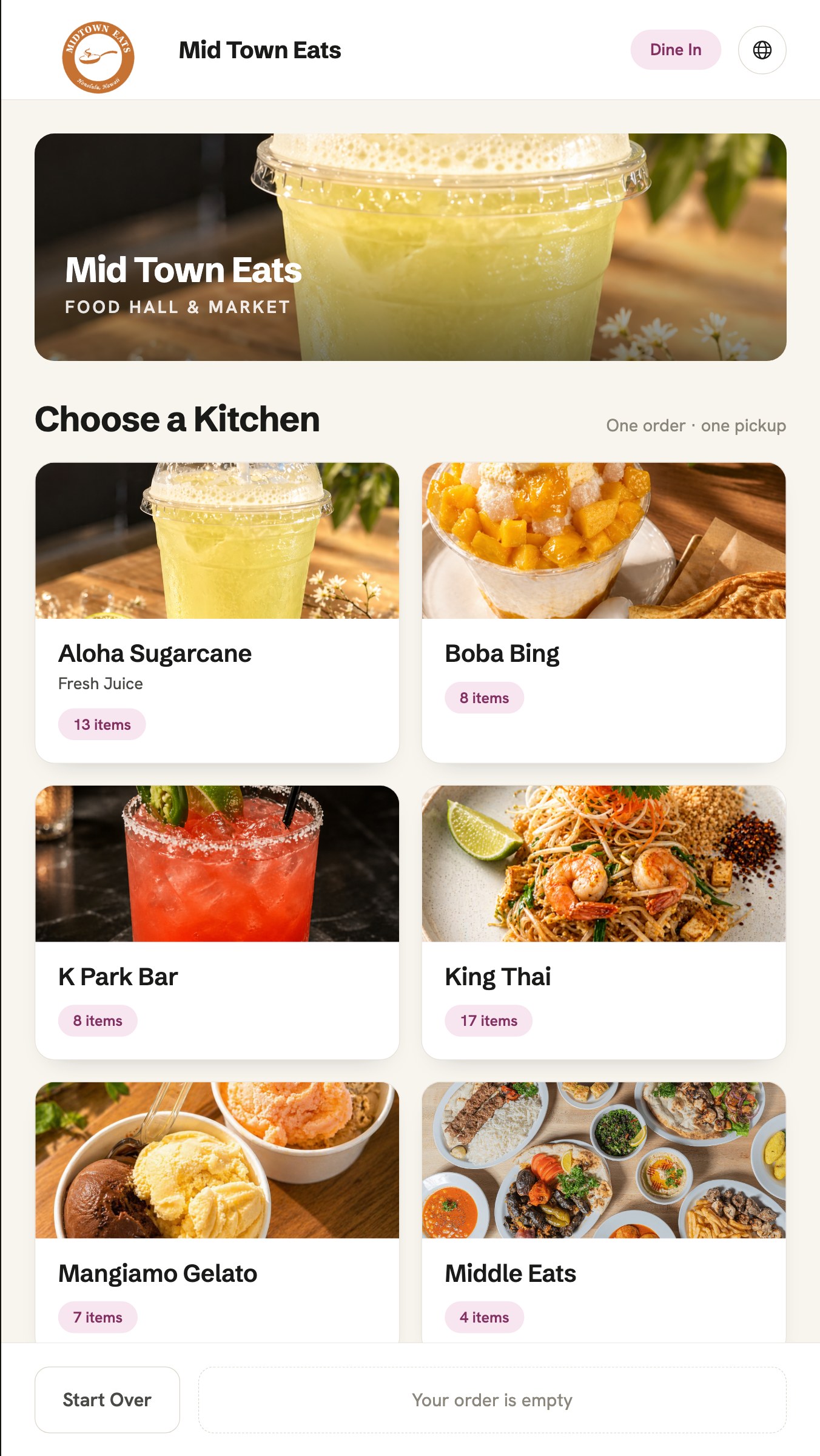
Food court kiosk — customer choosing a kitchenKiosk
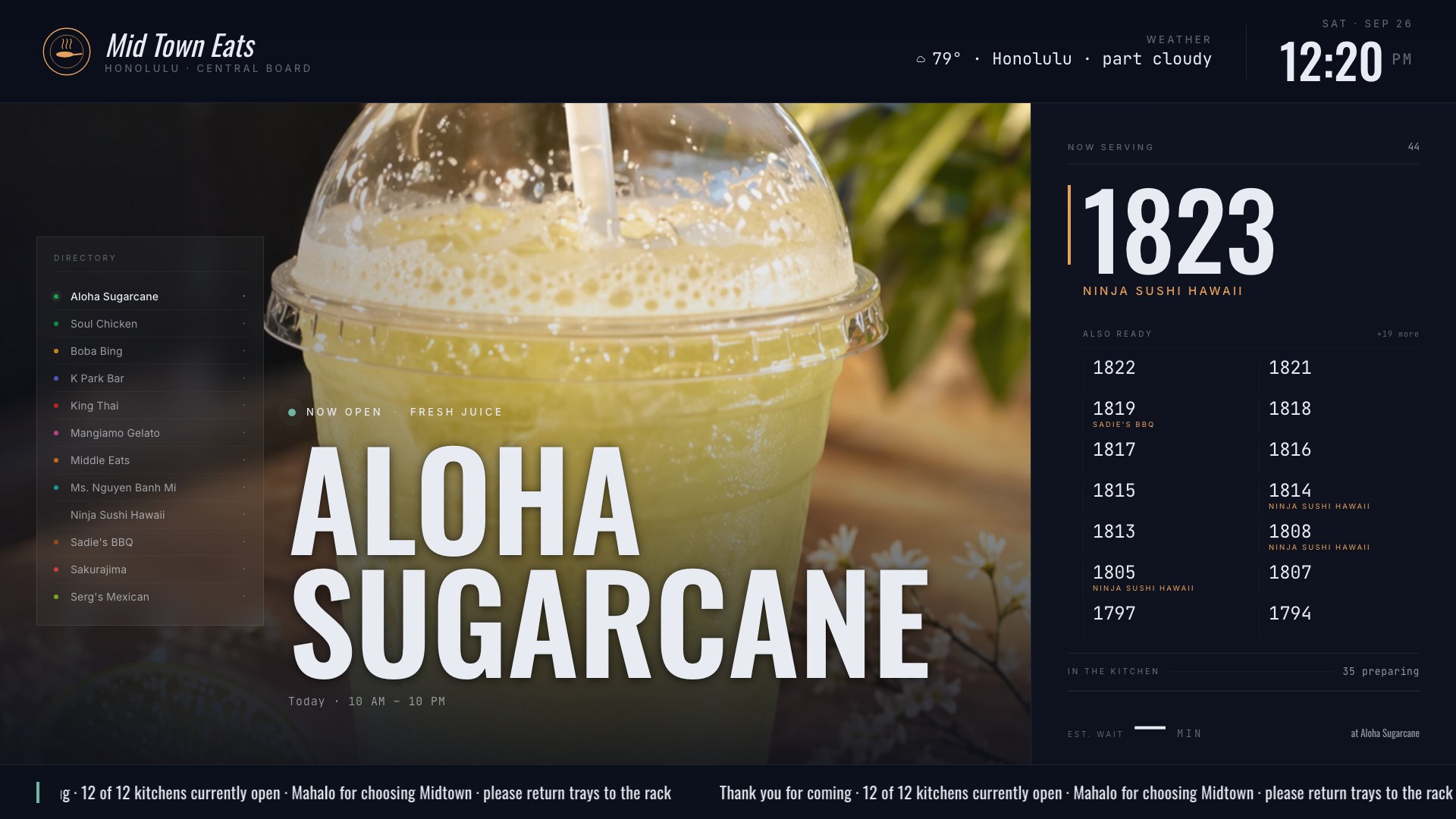
The Central Board — ready order numbers for the whole courtCentral Board
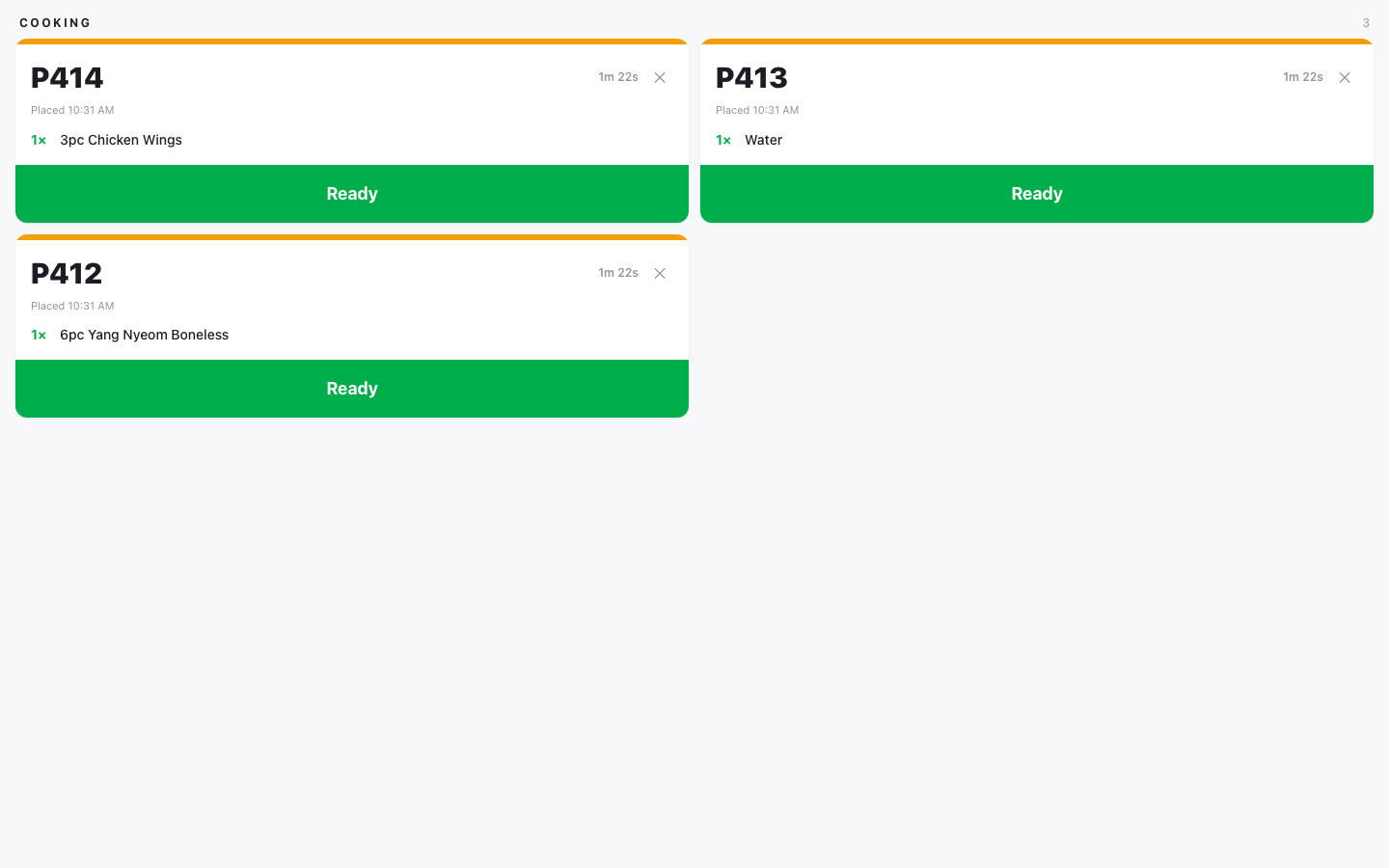
A store's kitchen screen with orders waiting to be marked readyKitchen
Live screens from a Honolulu food court.
Made for courts with many owners

Every store on one kiosk. Nothing replaced.

A food court is a row of separate businesses — different owners, different registers, different bank accounts. Putting one kiosk in front of all of them has usually meant every store moving onto the same system, or one account collecting everyone's money. ServeBoard brings the stores together as they are.

Keep the register you have
Square, Clover, or no register at all. Each store's menu comes in from the system it already runs — nothing to re-type.
Keep your own money
Every sale at the kiosk lands in that store's own merchant account, with the store's own name on the customer's card statement.
Join without a rebuild
Connect a store from the back office and its menu shows up on the kiosk. Disconnect it the same way — nothing to rip out.

One kiosk. Each store gets paid directly.

The customer sees one kiosk. Each store sees only its own orders and its own money.

STEP 01
Customer picks a store
Menus come live from each store — photos, options, dine in or to go, in five languages.
STEP 02
Taps their card
The money lands in that store's own account. Nothing extra is charged to the customer.
STEP 03
The ticket prints in that store's kitchen
The order also lands in that store's own system, the moment the payment is approved.
STEP 04
The shared TV calls the number
The store marks it ready and the Central Board calls it out for the whole court.
Central Board

One screen calls every store.

The Central Board hangs where the whole court can see it. Ready numbers are called big for every store. In between, it rotates each open store's page, local headlines and your own promotions.

The Central Board — ready order numbers for the whole courtStore page
The Central Board showing a local news headline between ready order numbersLocal news
The live Central Board in a Honolulu food court.
Your screen time

Your ads on the big screen.

Everyone in the court looks at the Central Board while they wait. Put your own events and specials on it, straight from the back office.
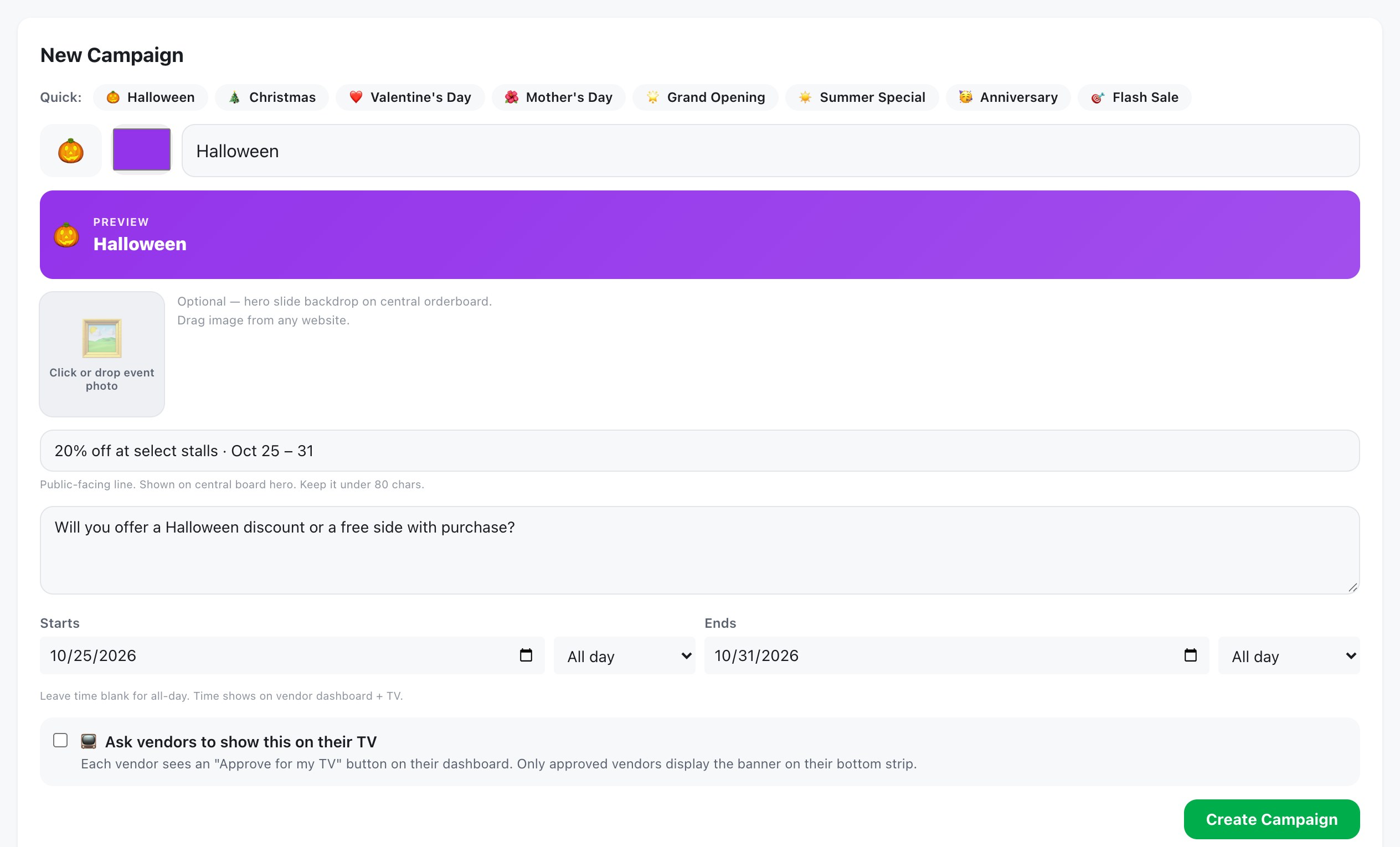
The back office screen where the court creates an event for the Central Board — name, photo, the line customers see, start and end datesBack office
Your own promotion
Upload a photo for an event or a sale and it gets its own turn on the big screen, between the stores.
Starts and stops on its own
Set the dates once. It comes on when it should and drops out when it is over.
Local news between orders
Pick a local feed and the headlines rotate in with their photos. A line of your own runs across the bottom.
Back office

Every store. One screen.

Every store in the court, in one back office — menus, hours, kiosk sales and orders, side by side. No calling around, no waiting for anyone's report.
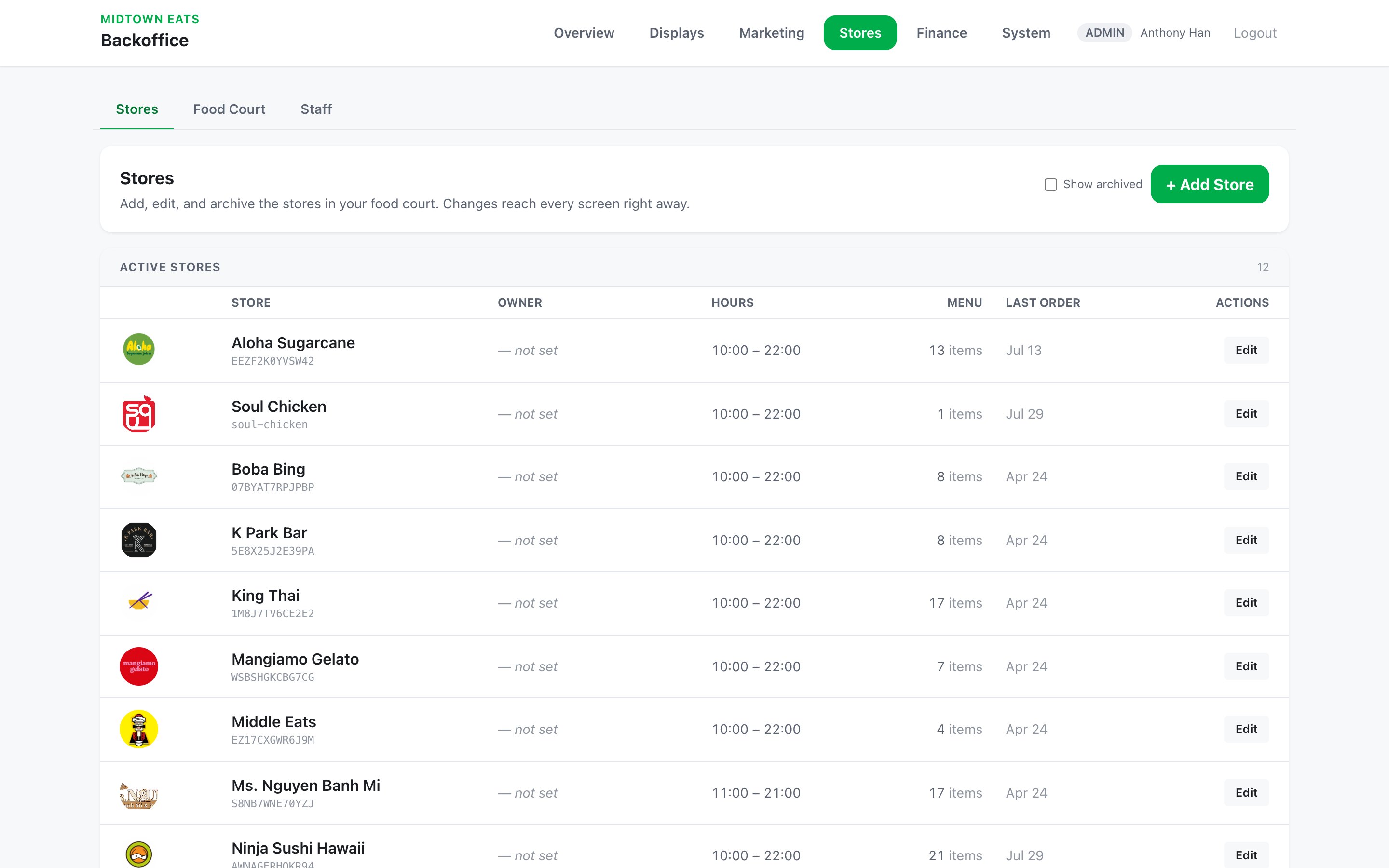
The back office store list — every store in the court with its logo, hours and menuBack office
The live back office in a Honolulu food court.
Every store on one list
Logos, hours and menus for the whole court. Add, edit or archive a store and every screen follows.
Sales by store, side by side
Today, yesterday, the last 7 or 30 days, the month, or any dates you pick.
Open any store
Tap a store to see just its numbers. Tap back to see the whole court again.
What is selling
Top sellers and slow movers for the whole court, or for one store.
For property managers

Manage the property? Run every screen on it.

If you manage the building, the screens outside the food court run on ServeBoard too. And you see how every store in the court is selling, without asking anyone.

Screens beyond the food court
Notice boards for other stores and amenities — the lobby, the gym, the parking level. Each screen shows its own photos, notices and events, and you change them from your computer.
Every store's sales
Kiosk sales for every store in the court — today, this month, or any dates you pick. No waiting for anyone's report.

Why operators choose it.

Money splits itself
Each store's sales go into that store's own account. No pooling, no working out who is owed what at the end of the month.
A real card tap
Customers tap a card on a reader at the kiosk — not an online checkout. Nothing extra is charged to them.
Stores keep running their own shop
Every store has its own ServeBoard account — its own menu, orders, kitchen screen, reports and Store Board. You connect them; you do not take them over.
One place to watch the court
Sales by store, orders, refunds, and the health of every kiosk and printer — in one back office.

What's included.

Shared kiosk
Store picker, live menus with photos, item options, dine in / to go — in English, 한국어, 日本語, Español and 中文.
Card reader
One tap at the kiosk. The money lands in that store's own account — the court never touches it.
Central Board (TV)
The court's shared screen. Ready orders called big, each open store's own page rotating between them, and a closed store drops out on its own.
Your own screen time
Run your own promotion on that screen: upload a photo and it gets its own turn in the rotation, put a line across the bottom, pull in local sports and headlines. You set when each one starts and stops — nothing is scheduled by hand on the day.
Menu boards in the stalls
Any store can put its own menu on a screen in its stall — photos and prices, changing whenever the menu does. Same account, no second system.
Kitchen tickets
Printed at each store's own printer, automatically, the moment the payment is approved.
Back office
Connect stores, see sales per store, drill into one store, issue refunds, watch printers and readers, activity log.
Store hours
A closed store is greyed out on the kiosk and can't be ordered from. It opens and closes on its own.
Court-wide events
Set up an event — 10% off this Tuesday, a free side with any bowl — with its own photo for the big screen. Each store picks whether to join and on which items, prices move by themselves that day and go back after. Nobody has to call around.
One notice, every kitchen
Post a line — the bathroom code changed, a delivery is coming, closing early — and it lands on every store's kitchen and counter screen. No group chat, no email chain.
Giveaway QR board
Run a court-wide giveaway on the Central Board — the entry list belongs to the court.
Built to keep selling
A dropped connection never costs you an order — it arrives once the line is back. And nobody gets charged twice.

Setting up a court.

1
Each store gets its own ServeBoard account — menu, orders, and its own Store Board.
2
Card payments are set up for each store — each one paid into its own account.
3
Plug the kiosk tablet, card reader, and printers into the store network.
4
Each store shares a connect code — you paste it in the back office. Done.
No server and no extra equipment inside each store — the kiosk is the bridge.
What you need
  • A tablet for the kiosk
  • A card reader (we set it up)
  • A TV for the Central Board — free Fire TV app, or any Smart TV browser
  • A network kitchen printer in each store
  • Store Wi-Fi
Hardware is purchased separately.

$15 per connected store, per month.

$50 minimum. Billed monthly.

$15per store / mo
$50 minimum
  • Connecting a store costs the store $0.
  • Each store keeps its own ServeBoard subscription (from $39/mo) — that is what runs its menu, orders and Store Board.
  • Hardware is purchased separately.
  • No setup fee. Billed monthly.
Start free trial
15 days free. Everything except live payments and printing.
Talk to us

Set up for your court.

Every food court kiosk is set up for its own court — your stores, your menus, your screens. It usually takes about two weeks. Tell us about your court and we'll get in touch.

Common questions.

Into each store's own merchant account. The court never holds another store's money.

One kiosk. Each store gets paid directly.

Try it free for 15 days. Connecting a store costs the store nothing.

Just one store? ServeBoard
42ServeBoard Food Court© 2026 Oahu Merchant Service LLC